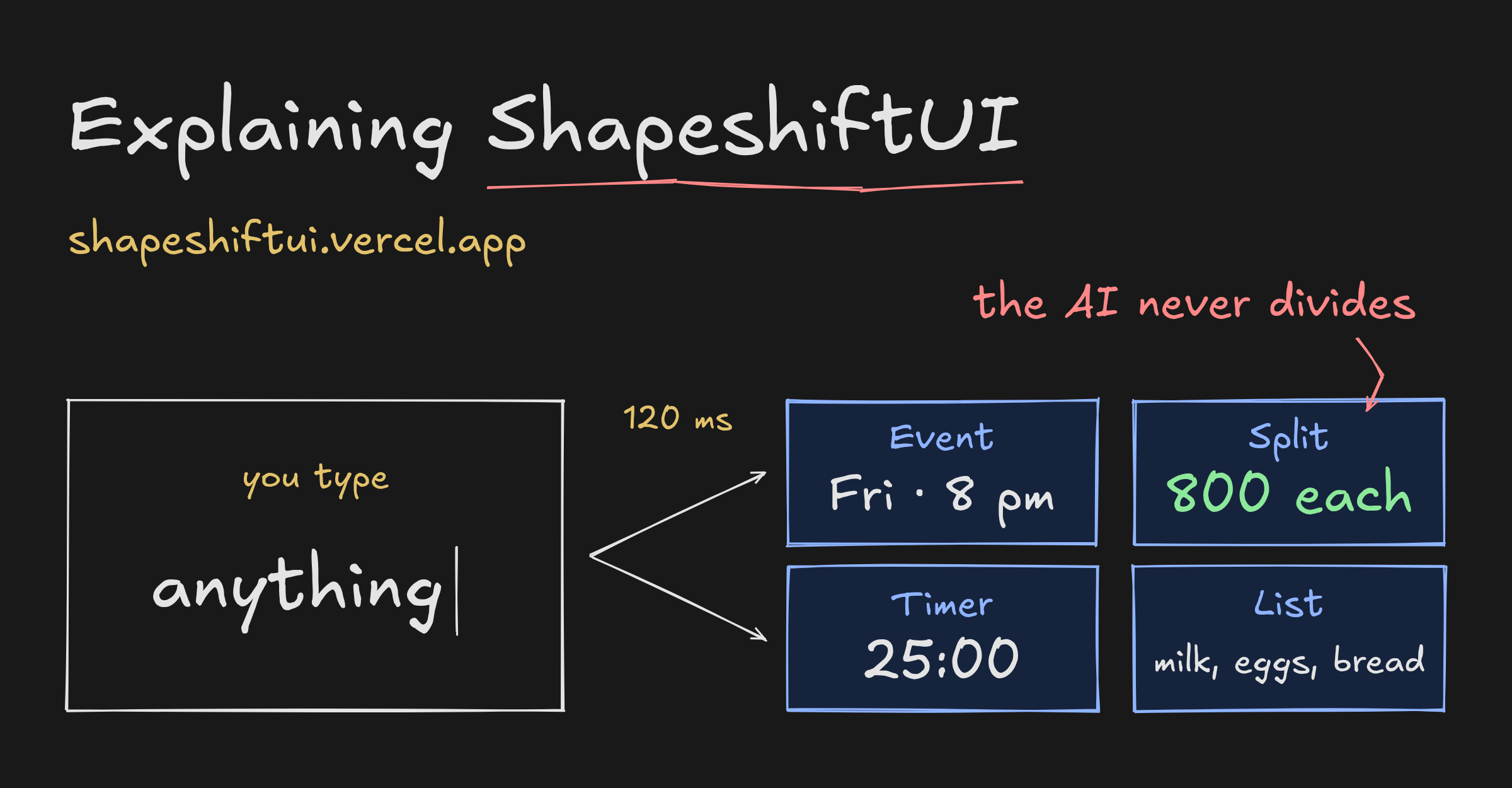
I built a thing called ShapeshiftUI. It is one text box. You type into it, and it turns into whatever you were describing. You can try it at shapeshiftui.vercel.app, and the code is at github.com/anishfn/shapeshift.
dinner with priya friday 8pm on zoom  →  an event, 8 pm, video call
buy milk, eggs, bread and coffee      →  a shopping checklist
split 2400 between 3                  →  ₹800 each
25 min focus                          →  a timer
minecraft diamond                     →  a swatch, #4AEDD9
There are nineteen card types. No dropdown, no "new event" button, no mode to pick first.
The interesting part is not the classifier. It is the rule the whole thing is built on: Jev decides, code computes. A model only ever guesses what kind of thing you are writing. Every number you actually see (the date, the amount, the division, the unit conversion) comes out of plain TypeScript.
The whole thing, once
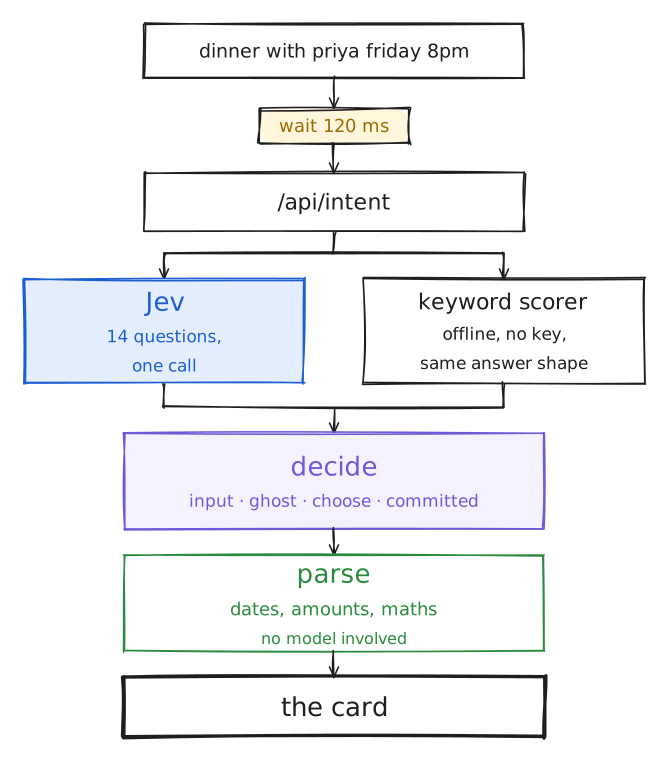
Here is every step between a keystroke and a card. The rest of this post walks down it.
Nothing happens while you are still typing
The hook is useIntent, and most of it is about not sending requests.
It waits 120 ms after you stop. Keep typing and the timer resets. When a new request does go out, the one in flight is aborted.
The subtler problem is ordering. Network responses do not come back in the order you sent them, so a stale answer for din can land after the fresh one for dinner with priya and overwrite it. Every request gets a sequence number, and only the newest one is allowed to touch state:
const seq = ++seqRef.current;
const result = await classify(text, controller.signal);
if (seq !== seqRef.current) return; // a newer request already won
Then there is a cache of the last 300 answers in the browser, keyed on the text lowercased with its whitespace collapsed, so Hello World and hello world are one entry. Backspacing over a word is free.
One call, fourteen questions
If it does have to ask, it asks the server, which holds the API key and its own cache of 500. What goes out is not a prompt. It is a fixed schema of fourteen questions, all evaluated against the same text at once.
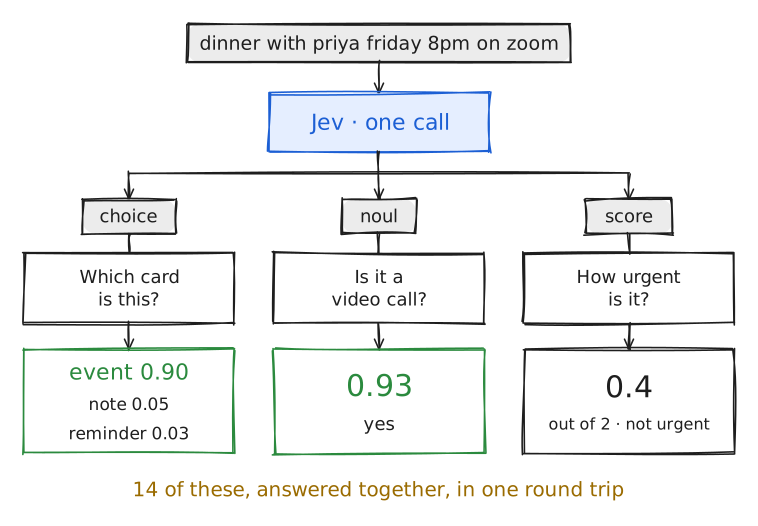
Three shapes, and that is the whole vocabulary:
| Type | What comes back | One of the fourteen |
|---|---|---|
choice | One option, plus a probability for every option | Which card is this? |
noul | A probability between 0 and 1 | Is it a video call? Does it repeat? |
score | A number on a 0 to 2 scale | How urgent is it? How complete is it? |
Because they all resolve in one call, asking about video calls on a message that turns out to be a bill split is not wasted work worth optimising away. The file asks everything, every time, and code throws away what the chosen card does not care about.
There is a comment at the top of that file that is really the design brief:
/**
 * Criteria rules: self-contained, non-overlapping, every signal
 * has an escape option, and never ask Jev to extract values,
 * count or do date math.
 */
Never ask Jev to extract values, count or do date math. Everything else in the app follows from that line.
The same answers, with no account
ShapeshiftUI runs offline by default, because a text box you cannot try is not a demo. With no key set, the request goes to a keyword scorer instead.
It is exactly as dumb as it sounds. Regexes award points:
if (has(DATE_WORDS, t)) add("event", gather || words.length <= 6 ? 2.5 : 1);
if (has(/\bon (zoom|meet|teams)\b/, t)) add("event", 2);
if (has(/\bsplit\b/, t) && has(/\d/, t)) add("split", 5);
Then a few rules stop cards from bullying each other (a strong remind me caps the event score, for instance), and the points are softmaxed into probabilities.
The output is the same shape as Jev's, field for field. Nothing downstream can tell which one answered. If the real model times out (2.5 seconds, no retry) the browser falls back to this and says Jev is busy once, and only once.
Raw confidence flickers
Feed the model output straight to the UI and you get a strobe light. After dinner w it is a note. After dinner with it is an event. After dinner with p it is a note again.
So decide.ts is a small state machine between the answer and the screen. Four states, and the thresholds are the whole of it:
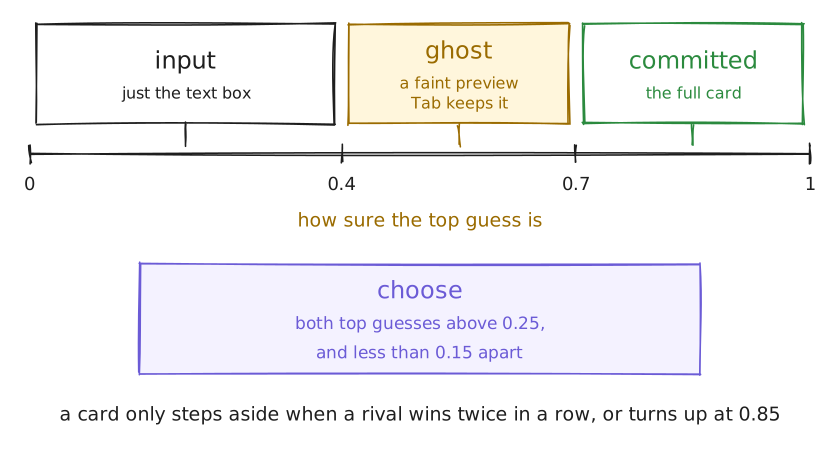
The thresholds are only half of it. The other half is inertia:
- A committed card does not step aside because a challenger edged ahead once. The challenger has to win twice in a row, or turn up at 0.85 or higher.
- It only collapses back to a plain text box if the current card's own probability falls below 0.3.
- If you picked the card yourself, from a chip or the
/palette, the model does not get a vote until you have changed about 30% of the text. That is measured with Levenshtein distance against the text as it was when you picked.
None of this is clever. It is just written down in one file instead of scattered across components.
Badges that do not blink
The same problem, one level down. A Video call badge whose signal is hovering near its threshold would flash on and off while you type.
Signals are gated with hysteresis, the way a thermostat is. On at one level, off at a lower one, and a dead band in between where the previous answer stands:
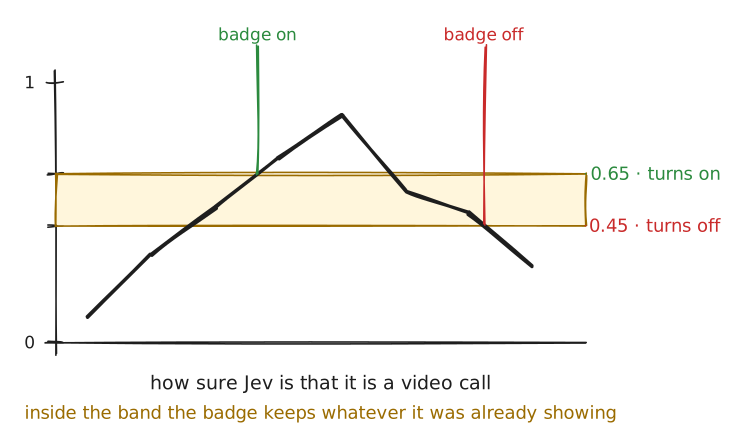
Yes-or-no signals turn on at 0.65 and off at 0.45. Urgency, on its 0 to 2 scale, turns on above 1.2 and off below 1.0. Each card declares which signals it reads (the event card wants eventMode, the travel card wants transport and tripType), so a badge cannot appear on a card that has nothing to do with it.
Then code does the arithmetic
By now the app knows it is a split. It has not been told what to divide, and it never asks.
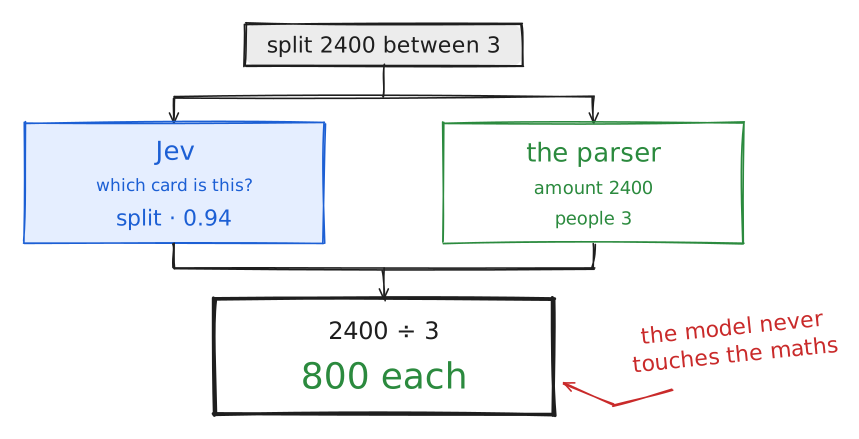
parseSplit reads the same string and finds the pieces. It handles between 3, three ways and me, rahul and priya as the same count. It finds the amount and the currency symbol. Dates elsewhere go through chrono-node, which is what friday 8pm becomes.
Each parser also returns a completeness score, which is what the little readiness bar is reading:
return (d.total ? 0.55 : 0) + (d.people ? 0.45 : 0);This is the part I would defend hardest. A model that has been asked to divide 2400 by 3 is a model that can, one time in some number of tries, say 700. A model that has only been asked is this a bill split? cannot get the arithmetic wrong, because it was never near it.
One entry per card
registry.ts is the only file that knows cards exist. Each entry names the component, the icon, the signals it reads, the badges it can show, and how to write itself as one line of text:
split: {
  label: "Split",
  example: "split 2400 between 3",
  icon: Users,
  signals: [],
  summary: (d) =>
    d.total && d.people
      ? `${formatAmount(d.total, d.currency)} ÷ ${d.people}` +
        ` = ${formatAmount(d.total / d.people, d.currency)} each`
      : "Split",
  Component: SplitCard,
},
That example string is not decoration. It is what the / palette lists, so every card type carries its own demo.
Press Enter and the card goes into localStorage. Nothing reaches a server. Open tabs stay in sync through the storage event, and ?demo=1 keeps everything in memory so a demo never lands in your real list.
Adding a twentieth card
- Add the key to
INTENT_KEYS. - Add one non-overlapping line describing it to the
intentquestion. - Write a parser, and register it.
- Write the component, and add a registry entry.
- Teach the offline scorer, and write the tests.
Miss any of the first four and TypeScript will not build. Miss the fifth and the tests will not pass. That is the extent of the ceremony, and it is deliberate: the day adding a card type stops being boring is the day nobody adds one.
Odds and ends
The stack is Next.js, React 19, TypeScript, Tailwind v4, shadcn/ui, Motion for the morph, chrono-node for dates, zod for the answer shape, and Bun.
?debug=1 puts every probability on screen while you type, which is the only honest way to tune a threshold. ?demo=1&loop=1 plays a scripted run. The tests in src/lib/__tests__/ cover the parsers, the state machine, the signal gates and the offline scorer, and bun test runs them.
The code is on GitHub, and the live one works without an account. Type something badly and watch it change its mind.