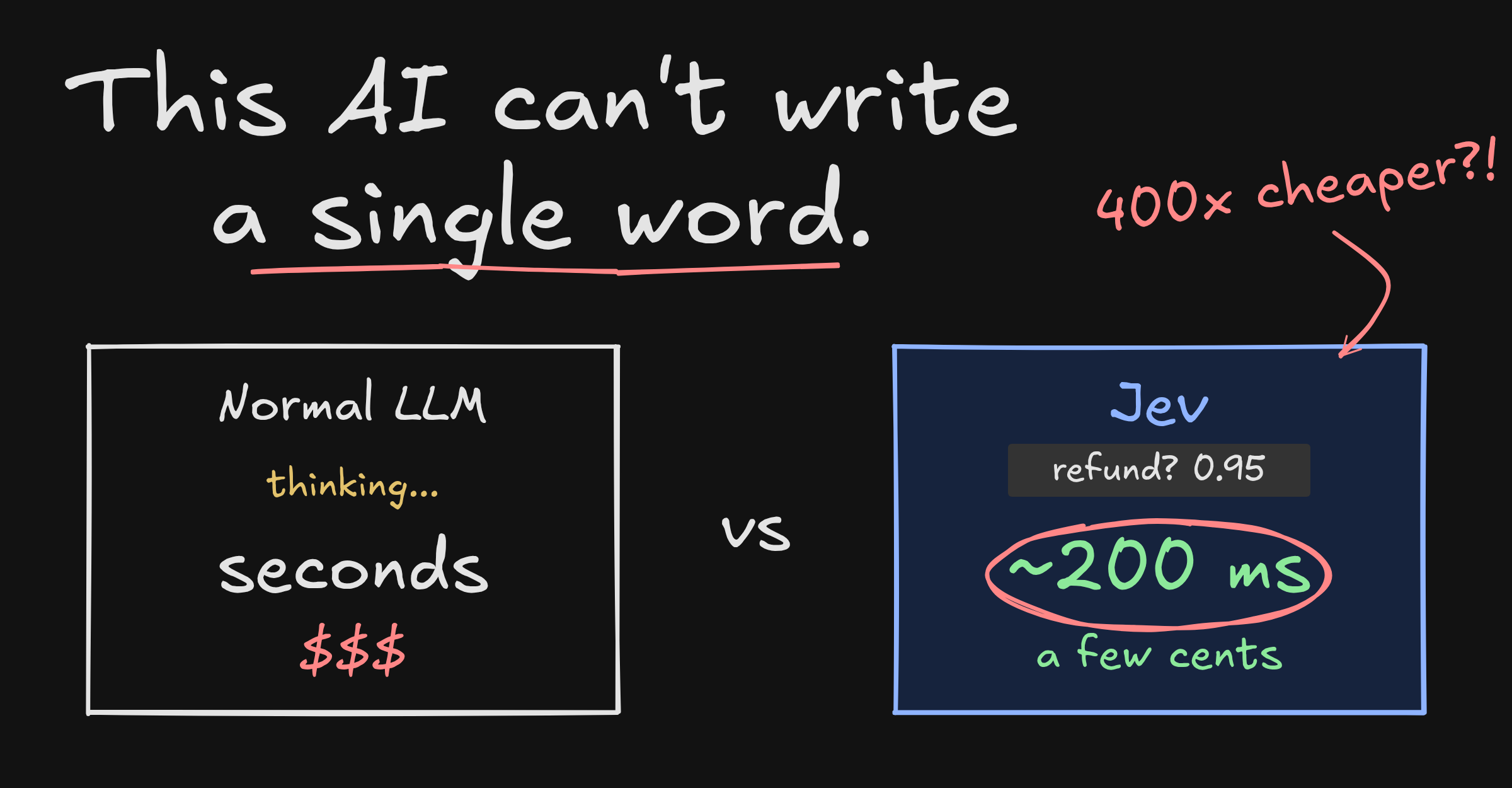
A new AI model came out this week and it is a little different from the ones we are used to.
It is called Jev. It comes from a company called TypeSafe AI, started by Diogo Almeida, who worked on ChatGPT and RLHF at OpenAI. 1
The headline numbers are simple:
20 to 200 times faster than a normal LLM
40 to 400 times cheaper than a normal LLM
But the most interesting part is not the speed.
It is this: Jev is not an LLM. It does not write paragraphs. It does not chat. It answers questions with numbers, and your code decides what to do with them.
I learned most of this from CJ's video on Syntax, which is worth watching. The diagrams below are redrawn from it. 2
Fast thinking and slow thinking
TypeSafe calls Jev a System One model.
The name comes from Daniel Kahneman's book Thinking, Fast and Slow. He describes the brain as having two modes: 3
System 1  →  fast, automatic, no effort
             "Is that face angry?"
             "What is 2 + 2?"

System 2  →  slow, careful, takes effort
             "What is 17 × 24?"
             "Is this argument logical?"
Most of your day is System 1. You do not think about reading a stop sign. You just know.
AI models map onto this nicely:
- Claude, ChatGPT, Gemini are System 2. They can reason for a while, write long answers and work through hard problems. They are also slow and expensive.
- Jev is System 1. It looks at something and gives an instant judgement.
So Jev is not trying to replace your LLM. It is the fast reflex that sits in front of it.
How it works
You give Jev two things.
- Your data. An email, a chat message, a piece of code, a web page. TypeSafe calls this the state.
- Your questions. What you want to know about that data, each with fixed options.
Jev gives back a probability for every option. That is it.
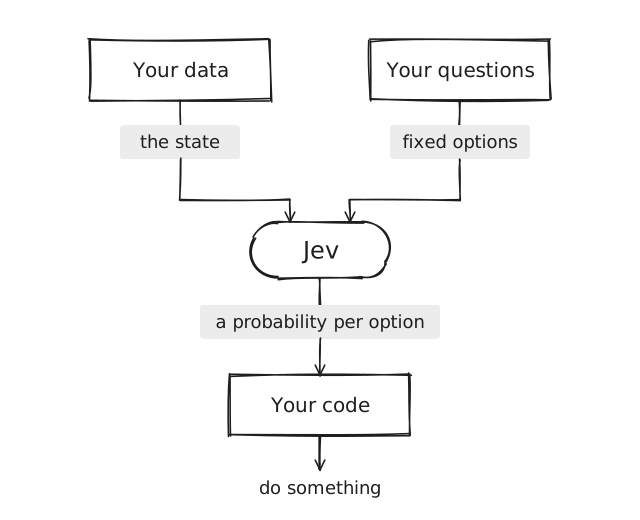
The important bit is the last box. Jev never does anything. It hands you numbers, and ordinary code with if statements takes it from there.
Three kinds of question
Jev understands three shapes of question.
| Type | What it asks | Example |
|---|---|---|
noul | Yes or no | Is this a refund request? |
choice | Pick one | Which team should handle this? |
score | Rate on a scale | How frustrated is the customer? |
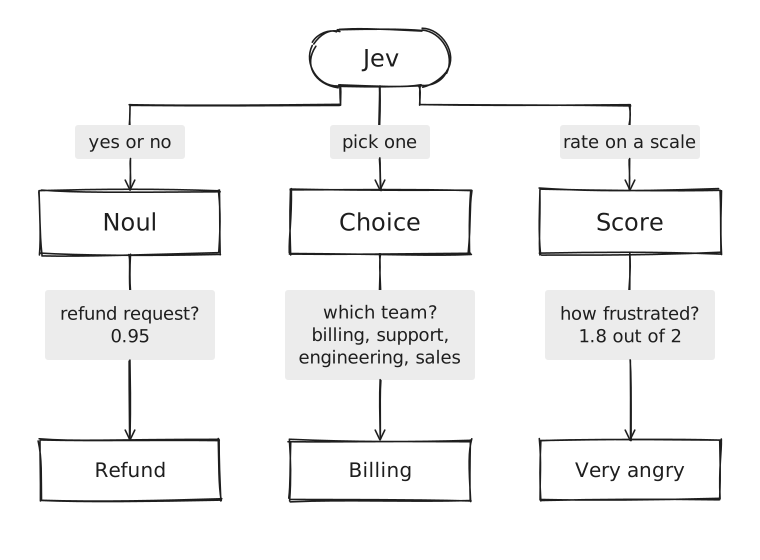
A noul gives you the probability of yes. A choice gives you the winning option plus how sure it is. A score gives you a number on the scale you defined.
None of them can give you something you did not ask for.
What the code looks like
If you have used any AI SDK before, this will look familiar.
import { TypeSafeClient, choice, noul, score } from "@typesafe-ai/sdk";

const client = new TypeSafeClient(); // reads TYPESAFE_API_KEY

const { answers } = await client.systemOne({
  state:
    "Hi, I was charged twice for my order and I'm really annoyed. Can I get a refund?",
  questions: {
    refund: noul("Does this message request a refund?"),
    team: choice("Which team should handle this?", {
      billing: null,
      technical: null,
      account: null,
    }),
    frustration: score("How frustrated is the customer?", [
      "Calm",
      "Frustrated but civil",
      "Very angry",
    ]),
  },
});
And what comes back is fully typed:
answers.refund.noul; // 0.95 • probability of "yes"
answers.team.choice; // "billing"
answers.team.confidence; // how sure it is about that pick
answers.frustration.score; // 1.8 on the 0 to 2 scale
Now you just write normal code:
if (answers.refund.noul > 0.9) {
  await startRefund(order);
}

if (answers.frustration.score > 1.5) {
  await pingAHuman(ticket);
}

await assignTo(answers.team.choice);
No parsing. No prompt tweaking. No wondering what the model meant.
Why not just ask an LLM?
You can. Most of us do.
The usual way to build an agent is one big prompt that asks the LLM to do everything on every message:
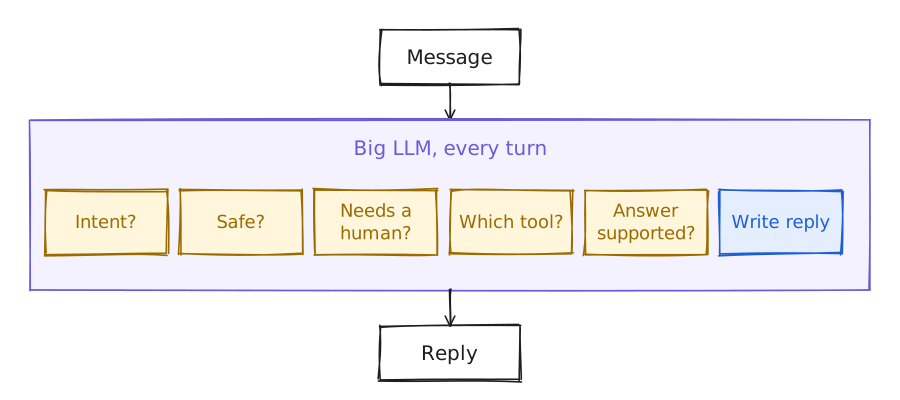
That prompt grows. You keep tweaking the wording. It works most of the time, and then one day it does not.
LLMs do support structured output, where you give them a schema and ask for JSON back. It helps, but it is not bulletproof:
try {
  const { output } = await generateText({
    model: "openai/gpt-5.6-luna",
    instructions: "Route support tickets to the right team.",
    prompt: ticket,
    output: Output.object({
      schema: z.object({
        team: z.enum(["billing", "technical", "account"]),
        confidence: z.number().min(0).max(1),
      }),
    }),
  });
} catch (error) {
  // The answer got cut off, or it did not match the schema.
  // Retry and hope.
}
The model is still writing JSON one token at a time. It can stop halfway. It can invent a field. And that confidence number is just the model guessing how confident it feels.
The same thing with Jev:
const { answers } = await client.systemOne({
  state: ticket,
  questions: {
    team: choice("Which team should handle this?", {
      billing: null,
      technical: null,
      account: null,
    }),
  },
});

answers.team.choice; // always one of the three
answers.team.probabilities; // a real probability for each
Nothing to parse, so nothing to retry.
Jev goes first
The pattern that falls out of this is simple. Put Jev at the front door.
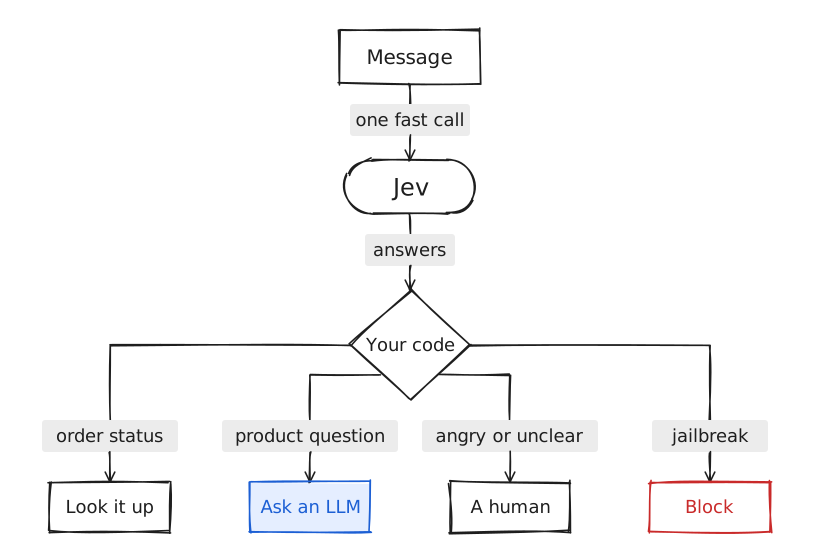
- Order status? Call your orders API. No LLM needed.
- Product question? Now call an LLM to write a good answer.
- Angry or unclear? Send it to a real person.
- Jailbreak attempt? Block it before it touches anything.
One cheap, fast call decides the route. The expensive model only runs when it is actually needed.
What people are building
Jev has only been out for a few days and people have already done some fun things with it.
Classifying lots of things
This is the obvious one.
- Someone sorted over a thousand AI research papers into categories. The whole job cost 8 cents, at about 256 ms per paper.
- The creator of Hiring Cafe used it to check whether a resume fits a job post, and found it around 10 times cheaper than small LLMs doing the same job.
- Someone pointed it at their own inbox to sort priority, spam and "should I reply?", and you can watch it chew through emails in real time.
Things that happen in real time
Because it answers so fast, Jev can keep up with things that change constantly.
- Writing feedback. A tool that scores your tone, conviction and urgency as you type, plus a "reads AI written" score built from simple rules you define yourself.
- Fixing your feed. A browser extension for X that hides rage bait, crypto and politics as you scroll.
- A live debate BS meter. Every sentence from both candidates checked with five yes or no questions. 1,191 calls, 415 ms median, and a total cost of about 5 cents.
- Games. Jev playing Tetris, deciding every move through API calls.
- Driving. Jev in a driving simulator, deciding whether to speed up, stop or turn based on signs, traffic and pedestrians.
Agents and code
- Browser use. An agent that found flights from Zurich to London in about 7 seconds, for less than half a cent. Browser agents are usually painfully slow because of all the back and forth with an LLM.
- Code review. A tool that reviews a diff by asking Jev fixed questions about each file, then draws a risk matrix of what looks unsafe or messy.
Checking what an LLM wrote
Here is one I really like, from the Syntax team.
They already use an LLM to write show notes from each podcast transcript: a summary, tags, chapter markers. The prompt is long and full of little rules, like "the word Sentry is often misheard, always spell it this way".
The problem with LLM summaries is that they can quietly make things up.
So the idea is to add Jev after the LLM:
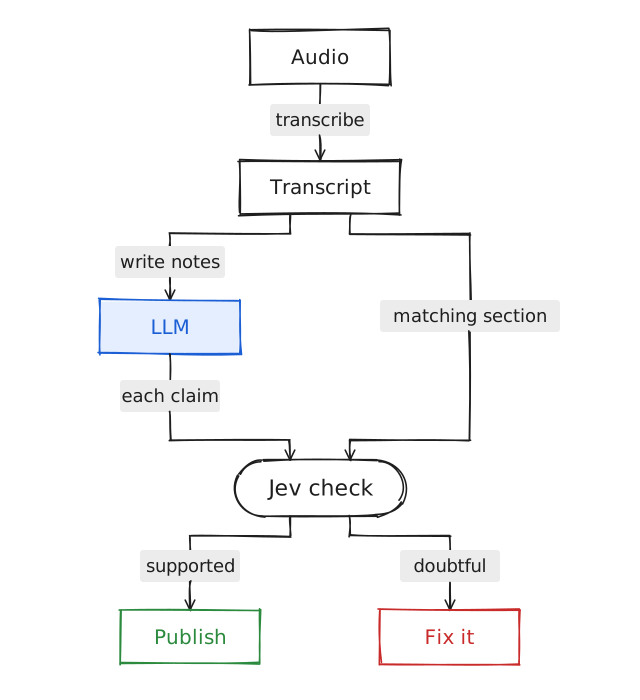
For every claim in the notes, grab the part of the transcript it came from and ask Jev one question: does this section support this claim?
for (const chapter of notes.chapters) {
  const section = transcriptAround(chapter.time);

  const { answers } = await client.systemOne({
    state: { claim: chapter.title, section },
    questions: {
      relation: choice("How does the section relate to the claim?", {
        supports: null,
        contradicts: null,
        not_mentioned: null,
      }),
    },
  });

  const ok =
    answers.relation.choice === "supports" &&
    answers.relation.confidence > 0.8;

  if (!ok) flag(chapter);
}
Checking every claim with an LLM would be slow and cost real money. With Jev it is cheap enough to just do it every time.
Picking which model to use
Another good fit is a model router.
Sentry has a Slack bot called Junior that can answer questions, open GitHub issues and write code. Before it replies, it decides which model to use. A quick "thanks!" does not need the biggest model. A request to debug a production issue does.
Right now that decision is made with a long prompt. With Jev it becomes two questions:
const route = await client.systemOne({
  state: { thread, message },
  questions: {
    reasoning: score("How much reasoning does this task need?", [
      "none • greetings or thanks",
      "low • a quick answer, no tools",
      "medium • normal work, some tool use",
      "high • research or careful writing",
      "xhigh • code changes, debugging, architecture",
    ]),
    profile: choice("Which profile fits this task?", profiles),
  },
});
Then plain code picks the model from the profile and sets the reasoning level from the score. The LLM only gets called once the route is decided.
A chatbot with no LLM in it
The last demo in the video is the one that made it click for me.
CJ built a chat assistant, starting from TypeSafe's smart home demo 4, that never calls an LLM. Every answer comes from a real tool.
You type something like:
tell me the weather in denver pleaseJev gets asked a handful of questions, all in one request:
Is this a new request, a confirmation, or a cancel?   →  new request
Which tool fits the last message?                     →  weather
Which place does the user mean?                       →  "denver"
Which time?                                           →  today
Which units?                                          →  fahrenheit
Notice the third one. Jev can point at a piece of your input, so it pulls "denver" straight out of the message. Then the code calls the weather tool with those arguments and shows the result.
It handles follow ups too. Ask "what is the high in Celsius?" and it sees the earlier answer in the conversation, then calls a unit conversion tool instead of doing the maths itself.
Ask "how tall is Mount Rainier?" and it fetches the Wikipedia article, then asks Jev to point at the exact sentence that answers the question. The reply is a quote, not a guess.
He also wired it up to Home Assistant, so he could type "turn off the top bulb" and a real light in his room turned off. Around 300 ms from typing to the light changing.
This is why it matters. When an LLM answers a factual question, you get a wall of text and no idea where it came from. When every answer comes from a tool, you know exactly where it came from.
When to reach for it
Jev is a good fit when:
- you already know the possible answers ahead of time
- you need to decide something quickly, or a lot of times
- you want your code, not a prompt, to own the logic
An LLM is still the right tool when:
- you need to write something
- you need real, multi step reasoning
- the possible answers are open ended
The nice part is that you do not have to choose. Put Jev in front, and only wake the LLM up when a message actually needs it.
Trying it yourself
There is a waitlist on the TypeSafe site. CJ got in within a day.
If you do not want to wait, Jev is also on the Vercel AI Gateway, so you can use it with an account you might already have. It may cost slightly more there, but it works the same way.
The TypeSafe docs have the patterns and cookbooks, including the smart home demo from the end of the video.